AI workspace for Standard Notes

Turn notes into finished thinking.

Smart Writer brings a capable writing assistant, focused text tools, and Nyra’s typed decision engine directly into the note you are already using.

One-time license options Web, desktop, iOS & Android Review before inserting
notes / product-launchConnected
Smart WriterConnected

Launch plan / Q3

Turn a rough idea into a clear brief your team can act on. Keep the context in the note and let AI handle the first pass.

Write a concise launch brief from this note...
AI ToolsNyraLumo MaxProfessional
AI result readyReview before insert

A focused launch brief with a clear objective, audience, message, and next steps.

Replace selectionInsertCopy
Built for momentumPrompt, review, refine, and keep moving.
10+focused writing tools
3typed decision types
2Lumo models to choose from
4ways to use Standard Notes
See it in action

Your notes, supercharged.

Lumo integrates seamlessly into the Standard Notes editor you already use every day.

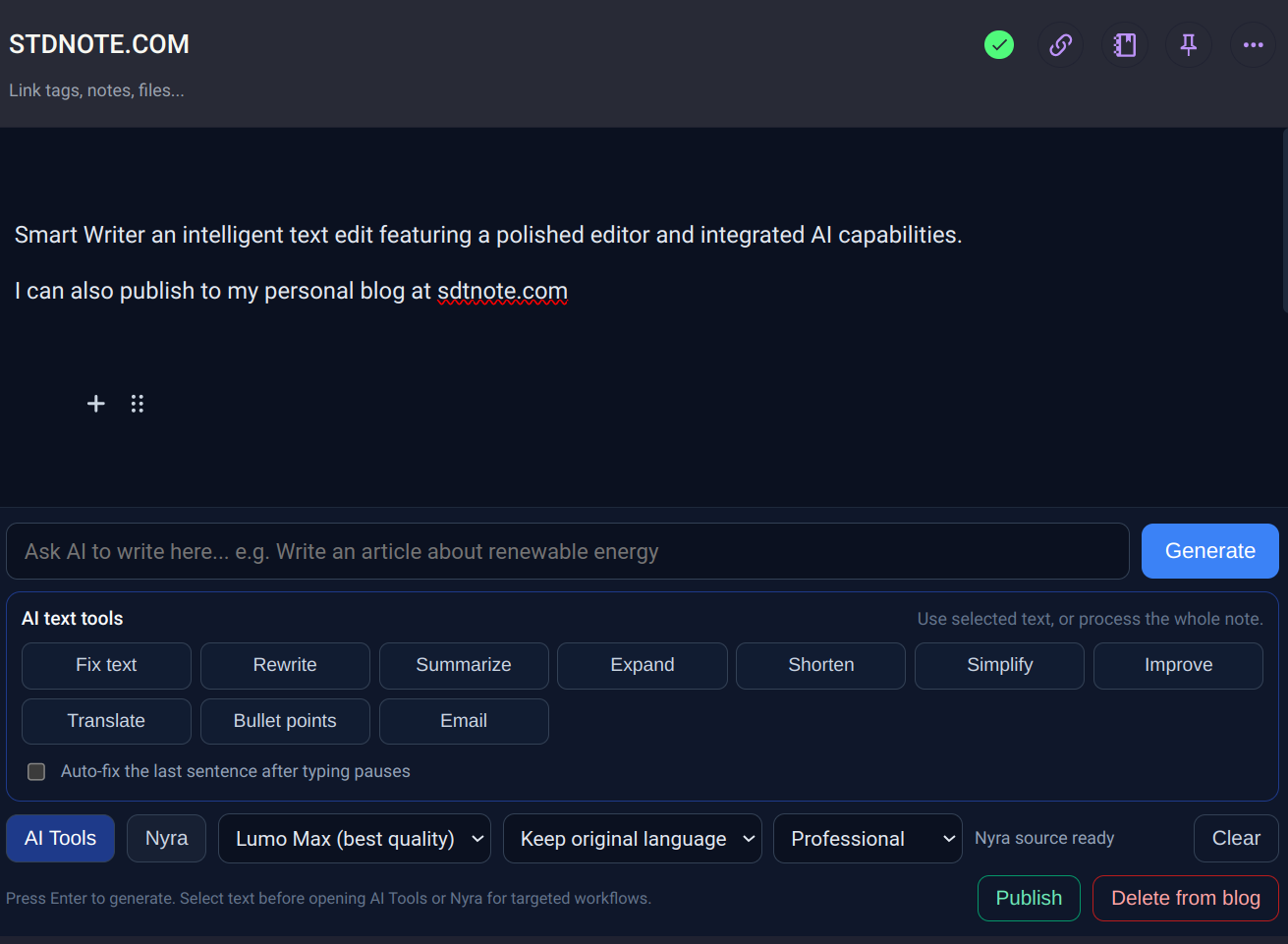
Smart Writer AI tools panel inside Standard Notes editor
AI writing tools instantly available in your note
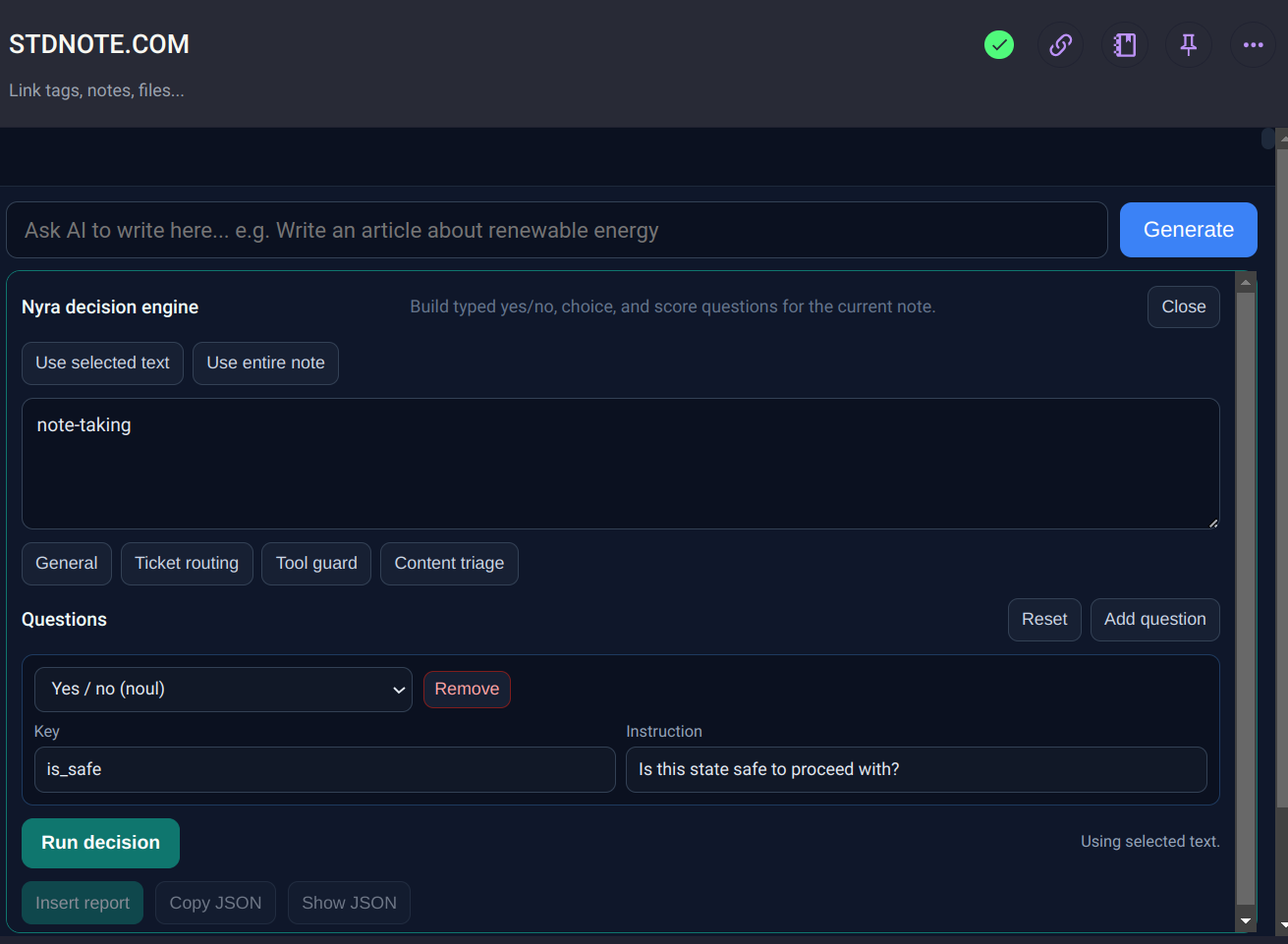
Structured AI decision output in Standard Notes
Get clear, actionable results from Nyra AI
Try before you buy

See what the intelligence can do.

Explore the two online experiences behind the plugin. No installation is needed to try the core ideas before choosing a license.

Nyra AILive demo

Decisions, not vague prose.

Send context and typed questions. Nyra returns structured yes/no, choice, and score answers with confidence your software can act on.

  • Test calibration and guardrails
  • Try ticket routing and triage questions
  • Inspect the raw JSON response
Open Nyra live
Lumo DocsOnline studio

Explore a wider AI workflow.

Visit Lumo Docs to explore AI writing, prompts, themes, productivity tools, and practical examples of the Lumo ecosystem in the browser.

  • See writing and prompt workflows
  • Explore themes and productivity tools
  • Preview the broader Lumo experience
Explore Lumo Docs
One note, many superpowers

Everything you need to move from draft to done.

Lumo keeps the useful AI close to your thinking, while giving you control over what gets changed.

Write where you already think.

Ask in your own words and generate articles, emails, posts, outlines, code, and more directly inside your Standard Notes note. Results stream into a reviewable preview before anything is inserted.

10 focused text tools.

Fix, rewrite, summarize, expand, shorten, simplify, improve, translate, create bullet points, or turn a note into an email.

Fix textRewriteSummarizeTranslateBulletsEmail

Make decisions with Nyra.

Build typed questions from selected text or the whole note. Get calibrated yes/no, choice, and score answers with confidence and safety context.

Review, insert, undo.

Nothing is forced into your note. Preview results, replace a selection, replace the full note, insert a report, copy JSON, or undo the last AI edit.

Turn notes into published work.

When a note is ready, publish it to your configured Standard Notes blog space or remove it again without leaving your writing flow.

Choose your model and language.

Use Lumo Max for higher-quality work or Lumo Lite for faster drafts. Select the language and tone that match the note you are writing.

Lumo MaxLumo LiteProfessionalAcademicTechnical10+ languages

Smart text transformations.

Transform any text with intelligent operations: expand, condense, rephrase, summarize, extract key points, or adapt tone instantly.

Work in your preferred language.

Write, refine, and publish in your native language. Smart Writer supports seamless multilingual workflows without losing nuance.
01 / CONTEXTLess tab switching

Keep prompts, source text, AI output, and the final note in one focused workspace.

02 / CONTROLYou approve the edit

Preview, choose the scope, insert deliberately, and undo when you want a different direction.

03 / FLEXIBILITYWriting and decisions

Use Lumo for language and Nyra for typed, confidence-aware answers in the same plugin.

04 / SECURITYCredential isolation

Provider credentials stay in the server-side proxy instead of being shipped in the editor bundle.

Built for real work

One plugin, many ways to use it.

Start with a sentence, a messy note, a ticket, or a decision that needs a little structure.

For writers

Draft without losing your voice.

Turn a rough idea into an article outline, rewrite a paragraph, adjust tone, or shape a newsletter before you publish.

OutlinesNewslettersEditing
For support & ops

Route work with evidence.

Use Nyra to classify a ticket, estimate urgency, choose an owner, and record confidence alongside the answer.

Ticket routingTriageGuardrails
For builders

Make tool actions safer.

Ask calibrated yes/no questions before an action, score urgency, and keep a structured decision report in the note.

Tool guardJSONAutomation
For learning

Study in your own language.

Summarize source material, simplify difficult passages, create bullet points, and translate explanations while keeping the original nearby.

SummariesTranslationStudy notes
A simple setup

From install to first useful result in minutes.

Lumo is designed to feel native to Standard Notes: install the component, activate your license, and work from the editor you already know.

Current v3 install URLStandard Notes
https://stdnote.com/v3/install.json
Paste this in Preferences → Plugins.
01

Install the component

Open Standard Notes on web, desktop, Android, or iOS. Go to Preferences → Plugins and install the custom component URL.

02

Activate your license

Enter the license key you receive after purchase and choose the blog name you want to use for publishing.

03

Choose your workflow

Generate from the prompt bar, open AI Tools for a selected passage or the whole note, or open Nyra for structured decisions.

04

Review, insert, and keep moving

Inspect the result, choose where it belongs, insert or copy it, and use Undo if you want to try another direction.

Simple access

Choose the license that fits your devices.

One-time payment, instant license key, and no subscription flow. Activate the key in the editor when you are ready.

Single device

$5 USD

A simple license for one personal device.

  • Smart Writer for one device
  • Writing tools, Nyra, and blog publishing
  • Instant key after checkout
Choose single device
Questions, answered

Good to know before you start.

Still evaluating? Test Nyra and Lumo Docs online first, then come back when you are ready to work inside Standard Notes.

What is the difference between Lumo and Nyra?

Lumo is the writing and productivity layer: it generates prose, transforms text, previews edits, and helps publish a note. Nyra is the decision layer: it evaluates typed questions and returns yes/no, choice, or score values with confidence.

Can I test the features before buying?

Yes. Use the Nyra live demo for structured decisions and explore Lumo Docs for the broader Lumo experience before installing the plugin.

Which Standard Notes apps are supported?

The component is designed for Standard Notes on the web, desktop, Android, and iOS. Installation is done through the Standard Notes plugin preferences.

What happens to my notes and API credentials?

The plugin uses Standard Notes’ component bridge to work with the note you are editing. Provider API credentials stay in the server-side proxy rather than being included in the editor JavaScript. As with any AI feature, review generated content before publishing.

Can I undo an AI edit?

Yes. The editor keeps a temporary undo action for AI edits and Nyra report insertion, so you can return to the previous note content if the result is not the direction you want.

Why do I need to insert the license on every new note?

This is a deliberate security measure enforced by Standard Notes. By requiring re-authentication for each component session, we ensure that your API credentials are never persistently stored in your browser, protecting your access even if your device is compromised.

Why does Smart Writer use Lumo AI?

We chose Lumo AI because of its uncompromising commitment to privacy. Lumo operates with a strict no-logs policy, meaning your prompts and generated content are never stored or used to train models. Your data is processed in memory only, ensuring complete confidentiality for your sensitive notes.

Keep your notes. Upgrade your thinking.

Install Smart Writer when you are ready to bring faster writing, structured decisions, and a calmer AI workflow into the place your notes already live.